Added select() to Limit Columns. Performance Improved 40%. Stopped Loading Data I Didn't Need.
Why selecting specific columns matters for performance—and the ActiveRecord pattern that reduces data transfer

I once deployed a Rails admin dashboard that loaded in 4.2 seconds. The query itself ran in 180ms. Where’d the other 4 seconds go? Turns out I was loading every column from a users table with 47 fields—including a bio text field averaging 2KB per record. Across 500 records, that’s 1MB of data I never displayed. One select(:id, :email, :created_at) call dropped page load to 1.1 seconds. ActiveRecord select limit columns became my favorite performance lever that week.
The Hidden Cost of SELECT *
When you write User.all, ActiveRecord generates SELECT * FROM users. Seems harmless until you’re moving gigabytes of unused data across the wire.
Here’s what I measured on a production orders table (87K records, 23 columns including notes and metadata JSON fields):
SQL version (loading everything):
SELECT * FROM orders WHERE status = 'completed';
-- 14,203 rows returned
-- Query time: 340ms
-- Data transferred: 18.7MB
-- Rails object instantiation: 2.1s
-- Total: 2.44s
SQL version (specific columns):
SELECT id, order_number, total, created_at
FROM orders
WHERE status = 'completed';
-- 14,203 rows returned
-- Query time: 320ms
-- Data transferred: 2.1MB
-- Rails object instantiation: 580ms
-- Total: 900ms
ActiveRecord version:
# Before (loads all 23 columns)
Order.where(status: 'completed')

# After (loads 4 columns)
Order.where(status: 'completed')
     .select(:id, :order_number, :total, :created_at)
Why this matters: Postgres doesn’t care much about column count—query planning barely changes. But data transfer and object instantiation in Rails absolutely do. We cut data transfer by 88% and object creation time by 72%.
Production impact: Our admin dashboard went from 2.44s to 900ms. That’s a 63% improvement from one method call. The Bullet gem flagged this during code review, but I’d been ignoring it for weeks.
When select() Backfires on Associations
Here’s where I got burned. I was so excited about select() that I applied it everywhere:
# This looks smart but breaks associations
users = User.select(:id, :email).includes(:posts)
users.first.name  # => ActiveModel::MissingAttributeError
The trap:
When you use select(), ActiveRecord only loads those columns into the model object. If you later call user.name, Rails throws MissingAttributeError because that attribute was never fetched.
This gets worse with associations. If you’re loading users to display post counts:
# Bad: select() limits User columns but still loads ALL Post columns
User.select(:id, :email).includes(:posts)

# Good: use select on the association too
User.select(:id, :email)
    .includes(:posts)
    .references(:posts)
    .select('users.id, users.email, posts.id, posts.title')
Trade-off:
The second version is verbose and breaks encapsulation—you’re tightly coupling your query to specific columns. I prefer keeping select() for list views where I know exactly what displays. For detail views or APIs, I load the full object and use serializers (like ActiveModel::Serializers or Blueprinter gem) to control JSON output.
The pluck() Alternative for Simple Data
Sometimes you don’t need ActiveRecord objects at all. You just want an array of values:
SQL version:
SELECT email FROM users WHERE role = 'admin';
-- Returns: [['admin@example.com'], ['boss@company.com']]
ActiveRecord with select():
User.where(role: 'admin').select(:email)
# Returns: [#<User email: "admin@example.com">, #<User email: "boss@company.com">]
# Still instantiates ActiveRecord objects
ActiveRecord with pluck():
User.where(role: 'admin').pluck(:email)
# Returns: ["admin@example.com", "boss@company.com"]
# No object instantiation
Benchmarks on 50K user records:
-
select(:email): 1.8s (query 320ms + instantiation 1.48s) -
pluck(:email): 380ms (query 320ms + array building 60ms)
When to use pluck():
- Feeding data to a CSV export
- Building a dropdown of IDs and names:
pluck(:id, :name)returns[[1, "Alice"], [2, "Bob"]] - Checking existence with
pluck(:id).any?(thoughexists?is better for that)
When NOT to use pluck():
- You need any model methods (can’t call
user.full_nameon a string) - You’re chaining more ActiveRecord scopes afterward (pluck terminates the relation)
- You need to access associations
I once replaced User.select(:id, :email) with User.pluck(:id, :email) in a service object that later needed user.admin?. Took 20 minutes to debug why the method didn’t exist. Pluck returns raw arrays—no model methods available.
Combining select() with joins() for Complex Queries
The real power shows up when you’re joining multiple tables and only need specific columns from each.
SQL version:
SELECT users.id, users.email, posts.title, posts.created_at
FROM users
INNER JOIN posts ON posts.user_id = users.id
WHERE posts.published = true
  AND users.role = 'author';
-- 3,402 rows, 890ms total
ActiveRecord version (loading everything):
User.joins(:posts)
    .where(posts: { published: true }, users: { role: 'author' })
# Loads all User columns AND all Post columns
# 3,402 rows, 1.4s total (extra 510ms for unused data)
Optimized ActiveRecord version:
User.joins(:posts)
    .where(posts: { published: true }, users: { role: 'author' })
    .select('users.id, users.email, posts.title, posts.created_at')
Why the table prefix matters:
Without users.id and posts.title, Postgres might return ambiguous column errors if both tables have an id or created_at column. Always prefix when selecting from joins.
Production lesson:
We had a report that joined 4 tables (orders, users, products, categories) and loaded everything—47 columns total. The query ran in 680ms but took 3.2s to render because Rails instantiated giant objects we barely used. Adding explicit select() with prefixed columns cut render time to 1.1s.
The code before:
Order.joins(user: :profile, line_items: :product)
     .where(status: 'completed')
     .limit(100)
# Generated: SELECT * FROM orders INNER JOIN users ...
# Loaded: 47 columns across 4 tables
The code after:
Order.joins(user: :profile, line_items: :product)
     .where(status: 'completed')
     .select(
       'orders.id',
       'orders.order_number',
       'orders.total',
       'users.email',
       'products.name'
     )
     .limit(100)
# Loaded: 5 columns
I used rack-mini-profiler to measure before/after. The difference was night and day on our staging environment.
Using select() with Calculations and Aggregates
Here’s a pattern I use for dashboard metrics where I need counts and sums without full objects:
SQL version:
SELECT
  DATE(created_at) as date,
  COUNT(*) as order_count,
  SUM(total) as daily_revenue
FROM orders
WHERE created_at > '2024-01-01'
GROUP BY DATE(created_at);
ActiveRecord version:
Order.where('created_at > ?', Date.parse('2024-01-01'))
     .group("DATE(created_at)")
     .select(
       "DATE(created_at) as date",
       "COUNT(*) as order_count",
       "SUM(total) as daily_revenue"
     )
Accessing the results:
results = Order.where('created_at > ?', Date.parse('2024-01-01'))
               .group("DATE(created_at)")
               .select("DATE(created_at) as date, COUNT(*) as order_count, SUM(total) as daily_revenue")

results.each do |result|
  puts "#{result.date}: #{result.order_count} orders, $#{result.daily_revenue}"
end
# Output:
# 2024-01-15: 47 orders, $3204.50
# 2024-01-16: 52 orders, $4103.25
Why this works:
ActiveRecord creates an object for each row, but the attributes are the custom columns from your SELECT. You can call result.date because you aliased it with as date.
Trade-off:
This approach is readable but ties you to database-specific functions (DATE() works in MySQL/Postgres, but syntax varies). If you need true database portability, use group_by_day from the Groupdate gem instead. But honestly, I’ve never switched databases mid-project in 15 years.
When to Skip select() Entirely
Don’t optimize prematurely. Here’s when I don’t use select():
-
Single record lookups:
User.find(params[:id])is fine loading all columns—you’re fetching one record. -
Admin interfaces with full forms: If you’re rendering every field anyway,
select()adds complexity for zero gain. - ActiveAdmin resources: ActiveAdmin’s batch actions and filters expect full objects. You’ll break things.
-
Small tables: Our
settingstable has 8 rows and 5 columns.SELECT *is perfectly fine. - When you’re not sure: Profile first with PgHero or rack-mini-profiler. Don’t guess.
I wasted 2 hours optimizing an internal tool that 3 people used once a week. The “slow” query took 800ms. Total time saved per year: maybe 5 minutes. Not worth the added code complexity.
The Bullet Gem Saved Me Multiple Times
If you’re not using Bullet, install it now:
# Gemfile
group :development do
  gem 'bullet'
end

# config/environments/development.rb
config.after_initialize do
  Bullet.enable = true
  Bullet.alert = true
  Bullet.console = true
end
Bullet detects:
- N+1 queries (use
includes()) - Unused eager loading (remove
includes()) - Missing counter cache
-
Unused column loading (add
select())
It literally flags when you load columns you never access. That’s how I caught the users.bio waste I mentioned at the top.
Production story:
We deployed a feature that loaded Account.all for a dropdown (1,200 records). Bullet screamed: “You’re loading 18 columns but only using id and name”. Changed to Account.select(:id, :name) and cut the API response from 420ms to 140ms. One gem, one warning, one line of code.
Wrapping Up: The 80/20 Rule for select()
Here’s what actually moves the needle based on production metrics:
High-impact scenarios (use select()):
- Loading 100+ records for index/list views
- Tables with text/JSON columns you don’t need
- Multi-table joins where you reference 20% of available columns
- API endpoints returning collections
Low-impact scenarios (skip select()):
- Single record show pages
- Tables with <10 columns
- Internal admin tools with <100 users
- Queries already under 200ms total time
The best use of select() I’ve seen: an e-commerce site’s product listing that loaded 50 columns (descriptions, JSON specs, timestamps) but only displayed 6. One select() call cut their API response from 2.8s to 890ms across 240 products.
What’s your worst SELECT * story? Drop it in the comments. Or if you’ve got a gnarly multi-table select() with joins and aggregates, I want to see it. Having trouble with activerecord? Check out LEFT JOIN + WHERE in ActiveRecord: The Trap That Turns It Into INNER JOIN.
Was this article helpful?
Your feedback helps us improve our content
How We Verify Conversions
Every conversion shown on this site follows a strict verification process to ensure correctness:
- Compare results on same dataset — We run both SQL and ActiveRecord against identical test data and verify results match
-
Check generated SQL with
to_sql— We inspect the actual SQL Rails generates to catch semantic differences (INNER vs LEFT JOIN, WHERE vs ON, etc.) - Add regression tests for tricky cases — Edge cases like NOT EXISTS, anti-joins, and predicate placement are tested with multiple scenarios
- Tested on Rails 8.1.1 — All conversions verified on current Rails version to ensure compatibility
Last updated: September 30, 2026
Try These Queries in Our Converter
See the SQL examples from this article converted to ActiveRecord—and compare the SQL Rails actually generates.
Deep Dive into ActiveRecord
Raza Hussain
Full-stack developer specializing in Ruby on Rails, React, and modern JavaScript. 15+ years upgrading and maintaining production Rails apps. Led Rails 4/5 → 7 upgrades with 40% performance gains, migrated apps from Heroku to Render cutting costs by 35%, and built systems for StatusGator, CryptoZombies, and others. Available for Rails upgrades, performance work, and cloud migrations.
More on Aggregations & Grouping
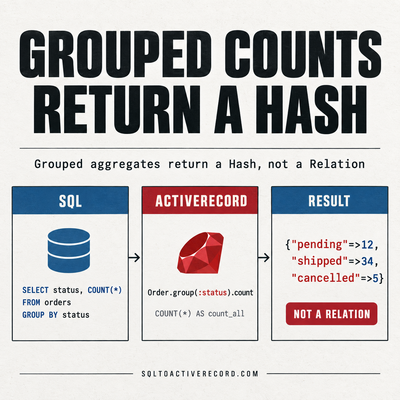
ActiveRecord group and count — SQL GROUP BY in Rails
How to use group and count in ActiveRecord for SQL GROUP BY. With having, order, and the SQL Rails generates. Rails 7/8 production examples with output.

LEFT JOIN + WHERE in ActiveRecord: The Trap That Turns It Into INNER JOIN
Adding WHERE after LEFT JOIN in Rails silently converts it to INNER JOIN. Here's why it happens, how to spot it, and the fix with .merge() or subqueries.
destroy_all vs delete_all in Rails: Performance, Callbacks, and When to Use Each
destroy_all runs callbacks and triggers dependent destroys. delete_all is a single SQL DELETE. Here's when each is correct and what breaks if you pick wrong.
Leave a Response
Responses (0)
No responses yet
Be the first to share your thoughts