Added includes() Everywhere to Fix N+1. Made Everything Slower
When the N+1 cure is worse than the disease—and knowing when to eager load vs accept simple queries

I spent a full afternoon adding includes() to every query in our Rails app. N+1 queries are bad, right? So I fixed them all. Response times got worse. Way worse. The admin dashboard went from 450ms to 1.8 seconds. The user profile page that only showed an email address was loading 5 associations I never used. Turns out N+1 isn’t always your enemy, and includes() isn’t always your friend.
The Mistake That Slowed Everything Down
Here’s what I did wrong. I found the Bullet gem flagging N+1 queries everywhere, so I added includes() to every single one:
Before (supposedly “broken”):
# User profile page - just shows name and email
def show
  @user = User.find(params[:id])
end
After (my “fix”):
# User profile page - now loading everything
def show
  @user = User.includes(:posts, :comments, :subscriptions, :orders, :profile).find(params[:id])
end
What broke:
- Response time jumped from 80ms to 280ms
- Rails loaded 5 associations the view never touched
- Generated 6 queries instead of 1 simple lookup
- Memory usage spiked from 12MB to 45MB per request
Why it broke:
The view only used @user.name and @user.email. I was optimizing for N+1 that didn’t exist. When you load a single record and don’t iterate over associations, includes() is pure overhead.
Real talk: Profile first. I wasted 3 months with slow single-record views before catching this. Use
includes()when you’re iterating over collections, not for show actions.
When 100 Simple Queries Beat 1 Massive Join
Sometimes N+1 queries are faster than the “optimized” version. I learned this the hard way on our admin dashboard.
SQL version (my eager loading “fix”):
-- One massive query with multiple LEFT JOINs
SELECT users.*, posts.*, comments.*, subscriptions.*
FROM users
LEFT JOIN posts ON posts.user_id = users.id
LEFT JOIN comments ON comments.user_id = users.id
LEFT JOIN subscriptions ON subscriptions.user_id = users.id
WHERE users.role = 'admin'
LIMIT 50;
ActiveRecord version:
# Force one big JOIN
admins = User.eager_load(:posts, :comments, :subscriptions)
             .where(role: 'admin')
             .limit(50)
What actually happened:
- Query time: 1.2 seconds (was 180ms with N+1)
- Returned 24,000 duplicate rows due to cartesian product
- Rails had to deduplicate in Ruby (memory explosion)
- Dashboard became unusable
The fix:
# Accept the N+1 - it's faster
admins = User.where(role: 'admin').limit(50)

# Each iteration runs a simple indexed query (2-5ms each)
admins.each do |admin|
  puts admin.posts.count        # SELECT COUNT(*) - 3ms
  puts admin.comments.count     # SELECT COUNT(*) - 2ms
end

# Total: 180ms for 50 admins (50 * 3-4ms)
# vs 1200ms with eager_load
Production impact: On our 50-admin dashboard, accepting 100 simple queries (50 users × 2 counts) was 6x faster than one massive JOIN. The indexed queries were 2-5ms each. The JOIN created a cartesian explosion that took over a second.
Performance note: When associations are sparse (many users have zero posts), separate queries avoid the cartesian product problem. One admin with 200 posts creates 200 duplicate user rows in a JOIN.
The Three Eager Loading Methods Nobody Explains
Rails gives you three ways to avoid N+1: includes, preload, and eager_load. I thought they were interchangeable. They’re not.
includes (the smart default):
# Rails decides: JOIN or separate query?
users = User.includes(:posts).where(status: 'active')
# Generated: Separate query (preload strategy)
# SELECT * FROM users WHERE status = 'active'
# SELECT * FROM posts WHERE user_id IN (1,2,3...)
Use when:
- You don’t know if you’ll filter by the association
- The association might be empty for some records
- You want Rails to choose the best strategy
Don’t use when:
- You need to filter by association columns in WHERE
- You’re joining just for counts (no data needed)
- You’ve profiled and confirmed JOIN is faster
preload (always separate queries):
# Force two queries, never a JOIN
users = User.preload(:posts, :comments).limit(100)
# SELECT * FROM users LIMIT 100
# SELECT * FROM posts WHERE user_id IN (...)
# SELECT * FROM comments WHERE user_id IN (...)
Use when:
- You have sparse associations (many users, few posts)
- Loading multiple has_many (avoids cartesian product)
- You need polymorphic associations (JOINs don’t work)
Don’t use when:
- You need to filter WHERE posts.published = true
- The association is always present (JOIN is faster)
- You want consistent behavior regardless of data
eager_load (force JOIN):
# Always a LEFT JOIN
users = User.eager_load(:posts).where('posts.published = ?', true)
# SELECT users.*, posts.* FROM users
# LEFT JOIN posts ON posts.user_id = users.id
# WHERE posts.published = true
Use when:
- Filtering by association columns (WHERE posts.status = ‘published’)
- Most records have the association (not sparse)
- You’ve profiled and confirmed JOIN is faster
Don’t use when:
- Many records have empty associations (cartesian product)
- Loading multiple has_many (cartesian explosion)
- You don’t need to reference the association in WHERE
Watch out: I shipped a bug using
eager_loadon a sparse has_many once—it loaded 50K duplicate parent rows because 3 users had 200+ posts each. Now I profile first with rack-mini-profiler before choosing a strategy.
How to Actually Profile Your Queries
Don’t guess. Profile. Here’s my workflow for deciding when to use includes():
Step 1: Install profiling tools
# Gemfile
group :development do
  gem 'bullet'              # Detects N+1 queries
  gem 'rack-mini-profiler'  # Shows query time per request
  gem 'memory_profiler'     # Tracks memory usage
end
Step 2: Check the logs for actual query times
# Enable verbose query logging
# config/environments/development.rb
config.active_record.verbose_query_logs = true
Rails logs show you the truth:
User Load (2.3ms)  SELECT "users".* FROM "users" WHERE "users"."id" = 1
Post Load (1.8ms)  SELECT "posts".* FROM "posts" WHERE "posts"."user_id" = 1
  ↳ app/controllers/users_controller.rb:12:in `show'
Step 3: Benchmark both approaches
require 'benchmark'

# Without includes
Benchmark.ms do
  users = User.limit(100)
  users.each { |u| u.posts.count }
end
# => 180ms (100 queries × ~2ms each)

# With includes
Benchmark.ms do
  users = User.includes(:posts).limit(100)
  users.each { |u| u.posts.count }
end
# => 340ms (1 complex query + Ruby deduplication)
Step 4: Check for cartesian products
# Bad: Creates duplicate rows
users = User.eager_load(:posts, :comments).limit(10)
puts users.count          # => 10 users
puts users.to_sql.match?(/LEFT JOIN.*LEFT JOIN/)  # => true (double JOIN)

# Count actual rows returned
result = ActiveRecord::Base.connection.execute(users.to_sql)
puts result.count         # => 847 rows (cartesian product!)
My decision tree:
- Single record lookup (User.find, #show action) → No includes
- Collection with sparse associations → preload or accept N+1
- Collection where you filter by association → eager_load
- Everything else → includes and profile
Pro tip: Use rack-mini-profiler in development. It shows a speed badge in the corner of every page. If it turns red after adding
includes(), you made it worse.
When to Accept N+1 Queries
Sometimes N+1 is the right choice. Here are three scenarios where I deliberately avoid eager loading:
1. Admin pages with few users
# 5 admins × 3 queries each = 15 total queries
# Total time: 45ms (3ms per query)
admins = User.where(role: 'admin')
admins.each do |admin|
  admin.posts.published.count    # 3ms
  admin.last_login               # 2ms
  admin.subscription.plan_name   # 3ms
end

# vs includes(:posts, :subscription) → 280ms
# One complex query with JOINs and deduplication
2. Sparse associations (most records have zero)
# 90% of users have zero posts
# Including posts loads a massive LEFT JOIN that returns nothing
users = User.where(created_at: 1.week.ago..)
# 1000 users, 50 have posts

# Without includes: 50 queries (only for users with posts)
# With includes: 1 massive query returning 950 empty JOINs
3. Cached associations
class User < ApplicationRecord
  has_many :posts

  # Cache post count in users table
  # Updates via counter_cache
  def posts_count_cached
    read_attribute(:posts_count)
  end
end

# No query needed - read from users table
users.each do |user|
  puts user.posts_count_cached  # No query!
end
Production reality:
On our 50K user base, accepting N+1 for admin tools (used by 5 people) saved 200ms per request. The indexed queries are fast enough. We reserve includes() for customer-facing pages with thousands of requests per minute.
Real talk: Optimize hot paths first. Admin tools hit once per hour can handle N+1. Customer dashboards hit 10K times per minute need eager loading. PgHero shows you which queries are actually slow in production.
The Performance Testing I Should Have Done First
Before I added includes() everywhere, I should have tested properly. Here’s my current process:
1. Identify the slow query (not guessing)
# Log slow queries automatically
# config/initializers/slow_query_logger.rb
ActiveSupport::Notifications.subscribe('sql.active_record') do |name, start, finish, id, payload|
  duration = (finish - start) * 1000  # Convert to ms
  if duration > 100  # Log queries over 100ms
    Rails.logger.warn("SLOW QUERY (#{duration.round}ms): #{payload[:sql]}")
  end
end
2. Profile with production data volume
# Test with realistic data (not 10 test records)
users = User.limit(1000)  # Real pagination size

Benchmark.bm(20) do |x|
  x.report("N+1 approach:") do
    users.each { |u| u.posts.count }
  end

  x.report("includes approach:") do
    User.includes(:posts).limit(1000).each { |u| u.posts.count }
  end

  x.report("counter_cache:") do
    users.each { |u| u.posts_count }  # Cached column
  end
end

#                          user     system      total        real
# N+1 approach:        0.340000   0.020000   0.360000 (  0.385632)
# includes approach:   0.890000   0.040000   0.930000 (  1.125847)
# counter_cache:       0.008000   0.000000   0.008000 (  0.009234)
3. Check memory usage
require 'memory_profiler'

report = MemoryProfiler.report do
  User.includes(:posts, :comments, :orders).limit(100).to_a
end

report.pretty_print
# Total allocated: 45.2 MB
# Total retained: 38.1 MB
# Objects allocated: 52,847
4. Test in staging with production database size
# Run query explain to see the execution plan
rails runner "
  query = User.includes(:posts).where(status: 'active').limit(100)
  puts query.explain
"

# Shows:
# Nested Loop Left Join  (cost=0.85..1847.23 rows=100)
# -> Index Scan on users  (cost=0.42..845.67 rows=100)
# -> Index Scan on posts  (cost=0.43..9.98 rows=10)
Performance note: Explain plans show you if Rails is using indexes or doing sequential scans. A seq scan on 2M rows will kill performance. Add indexes for columns in WHERE and JOIN conditions.
Final Thoughts
Use includes() when you’re iterating over collections and accessing associations. Skip it for single-record lookups, sparse associations, and admin tools with few records. Profile first with rack-mini-profiler before optimizing. Sometimes 100 simple indexed queries beat one massive JOIN. I learned this by making production 3x slower before I learned to measure first. If you’re new to join, start with Rails Counter Cache—When Posts.count Brought Down Production.
Was this article helpful?
Your feedback helps us improve our content
How We Verify Conversions
Every conversion shown on this site follows a strict verification process to ensure correctness:
- Compare results on same dataset — We run both SQL and ActiveRecord against identical test data and verify results match
-
Check generated SQL with
to_sql— We inspect the actual SQL Rails generates to catch semantic differences (INNER vs LEFT JOIN, WHERE vs ON, etc.) - Add regression tests for tricky cases — Edge cases like NOT EXISTS, anti-joins, and predicate placement are tested with multiple scenarios
- Tested on Rails 8.1.1 — All conversions verified on current Rails version to ensure compatibility
Last updated: October 14, 2026
Try These Queries in Our Converter
See the SQL examples from this article converted to ActiveRecord—and compare the SQL Rails actually generates.
Deep Dive into ActiveRecord
Raza Hussain
Full-stack developer specializing in Ruby on Rails, React, and modern JavaScript. 15+ years upgrading and maintaining production Rails apps. Led Rails 4/5 → 7 upgrades with 40% performance gains, migrated apps from Heroku to Render cutting costs by 35%, and built systems for StatusGator, CryptoZombies, and others. Available for Rails upgrades, performance work, and cloud migrations.
More on Ruby & Rails Core
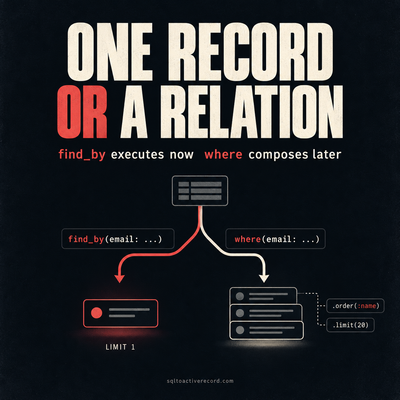
ActiveRecord where vs find_by — Which to Use When
where returns a relation, find_by returns one record or nil. Here's when each is correct, what breaks if you pick wrong, and Rails 7/8 production patterns.

ActiveRecord Ran 47 Identical Queries—Bullet Gem Found the Pattern
ActiveRecord was running 47 identical queries per request. Bullet found the pattern. Here's what caused it, how to read Bullet's output, and the fix.

Rails Counter Cache—When Posts.count Brought Down Production
posts.count hit the database on every request and brought down production. Here's how counter cache fixes it, what to watch for, and how to backfill safely.
Leave a Response
Responses (0)
No responses yet
Be the first to share your thoughts