Rails pick vs pluck: LIMIT 1 in ActiveRecord
pick returns one value with LIMIT. pluck.first fetches every row first. SQL output tested on ActiveRecord 8.1.
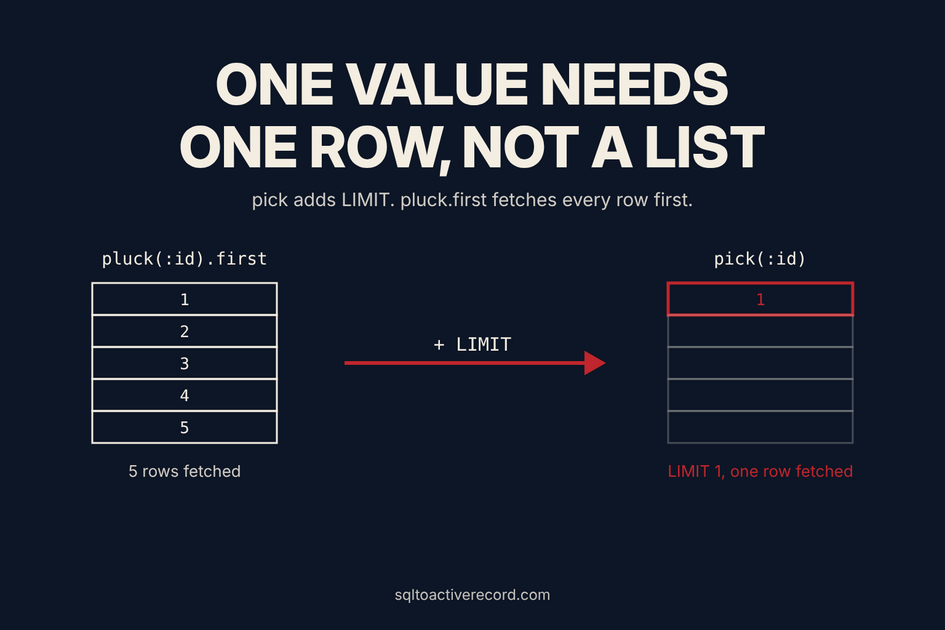
pick is pluck for one row. User.where(email: "a@example.com").pick(:id) runs SELECT "users"."id" FROM "users" WHERE "users"."email" = $1 LIMIT $2 and returns a single value or nil. pluck(:id).first runs the same query without LIMIT and builds an array of every matching id first. Use pick when you want one value, pluck when you want a list.
All examples ran on ActiveRecord 8.1.1 with PostgreSQL 16.15 on 22 November 2026. Relation#pick has been in Rails since 6.0, so everything below works on any supported version.
The schema used in every example
class User < ApplicationRecord
  has_many :orders
end

class Order < ApplicationRecord
  belongs_to :user
end
# users:  email, active
# orders: user_id, status, total, created_at
SQL LIMIT 1 to ActiveRecord pick
| SQL | ActiveRecord |
|---|---|
SELECT id FROM users WHERE email = '...' LIMIT 1 |
User.where(email: "...").pick(:id) |
SELECT id, email FROM users WHERE active LIMIT 1 |
User.where(active: true).pick(:id, :email) |
SELECT status FROM orders ORDER BY created_at DESC LIMIT 1 |
Order.order(created_at: :desc).pick(:status) |
SELECT id FROM orders WHERE user_id = 1 (all rows) |
Order.where(user_id: 1).ids |
Verified output:
User.where(email: "a@example.com").pick(:id)
# SELECT "users"."id" FROM "users" WHERE "users"."email" = $1 LIMIT $2
# => 1

User.where(active: true).pick(:id, :email)
# => [1, "a@example.com"]

Order.order(created_at: :desc).pick(:status)
# SELECT "orders"."status" FROM "orders" ORDER BY "orders"."created_at" DESC LIMIT $1
# => "paid"
One column returns a bare value. Two or more columns return an array in the order you asked for. No match returns nil, not an empty array.
pick vs pluck.first: what changes in SQL
Order.pluck(:status).first
# SELECT "orders"."status" FROM "orders"
# => "paid"

Order.pick(:status)
# SELECT "orders"."status" FROM "orders" LIMIT $1
# => "paid"
The results match. The first query has no LIMIT, so PostgreSQL returns every row and Rails builds an array of all of them before .first throws all but one away. On a table with 5 rows that does not matter. On a table with 5 million rows it does. RuboCop ships a Rails/Pick cop that flags pluck(...).first for this reason.
Two traps
No ORDER BY means no guarantee. Order.pick(:status) has LIMIT but no sort, so PostgreSQL returns whichever row it finds first. If you mean “latest” or “cheapest”, say so:
Order.order(:total).pick(:id)            # smallest order
Order.order(created_at: :desc).pick(:id) # newest order
Unlike first, pick does not add an ORDER BY "id" for you. This is the one behavior difference that surprises people who replace first with pick.
pick is not exists?. To test for presence, User.exists?(email: "a@example.com") runs SELECT 1 AS one ... LIMIT $2 and returns true or false. Use pick(:id).present? only when you also need the id.
pick vs find_by: skip the model object
A common pattern loads a whole record to read one attribute:
User.find_by(email: "a@example.com")&.id
# SELECT "users".* FROM "users" WHERE "users"."email" = $1 LIMIT $2
# => 1
find_by selects every column and instantiates a User, including attribute casting and callbacks like after_find. pick(:id) selects one column and returns a plain Integer. The difference is small for one lookup. It adds up in a hot path such as a before_action, a serializer or a loop that runs thousands of times per minute. If you need the record afterwards, use find_by. If you need one field, use pick.
Typical uses:
# Look up a foreign key without loading the parent
plan_id = Plan.where(code: params[:plan]).pick(:id)

# Read the latest timestamp for a cache key
last_change = Order.where(user_id: user.id).order(updated_at: :desc).pick(:updated_at)

# Two values from one row, destructured
id, email = User.where(active: true).order(:id).pick(:id, :email)
If the relation is empty, the destructuring line gives id = nil and email = nil because nil destructures into nils. Guard for the missing row when it matters.
Aggregates and expressions
pick accepts raw SQL fragments wrapped in Arel.sql:
Order.where(user_id: 1).pick(Arel.sql("MAX(total)"))
# SELECT MAX(total) FROM "orders" WHERE "orders"."user_id" = $1 LIMIT $2
# => 0.5e2  (BigDecimal 50.0)
For simple aggregates, Order.where(user_id: 1).maximum(:total) is shorter and returns the same value. Reach for pick(Arel.sql(...)) when no calculation method fits. Never interpolate user input into the Arel.sql string.
Already-loaded relations and associations
pick on an association works the same way, and the scope keeps its order:
user.orders.order(:created_at).pick(:total)
# SELECT "orders"."total" FROM "orders" WHERE "orders"."user_id" = $1
#   ORDER BY "orders"."created_at" ASC LIMIT $2
If the relation is already loaded, pick reads from the loaded records and sends no query:
paid = Order.where(status: "paid").load
paid.pick(:status) # no SQL logged
Rails made pick reuse loaded results in 6.1. That is the same rule pluck follows.
When to use which method
| You want | Use |
|---|---|
| One value from one row | pick(:col) |
| Several values from one row | pick(:a, :b) |
| A list of values | pluck(:col) |
| A list of primary keys | ids |
| A whole record |
find_by or first
|
| Yes or no | exists? |
For a longer look at pluck and memory, read pluck vs select vs map. For column selection in general, see Rails select in ActiveRecord.
Not sure how a SQL query maps to ActiveRecord? Paste it into the SQL to ActiveRecord converter and compare the output with .to_sql in your console.
Frequently asked questions
- What is the difference between pick and pluck in Rails?
- pluck returns an array of values for every matching row. pick returns the value for the first matching row only and adds LIMIT to the SQL. pick(:id) returns 1. pluck(:id) returns [1, 2].
- Is pick faster than pluck.first?
- Yes on large tables. pick sends LIMIT, so the database stops after one row. pluck(...).first fetches all rows and discards all but one.
- Does pick add an ORDER BY?
- No. first orders by primary key when the relation has no order. pick does not. Add order yourself when the result must be deterministic.
- What does pick return when nothing matches?
- It returns nil. With several columns it also returns nil, not an empty array.
- Which Rails version added pick?
- Rails 6.0 added Relation#pick. The Rails 6.0 release notes list it as a short-hand for single-value plucks.
Was this article helpful?
Your feedback helps us improve our content
How We Verify Conversions
Every conversion shown on this site follows a strict verification process to ensure correctness:
- Compare results on same dataset — We run both SQL and ActiveRecord against identical test data and verify results match
-
Check generated SQL with
to_sql— We inspect the actual SQL Rails generates to catch semantic differences (INNER vs LEFT JOIN, WHERE vs ON, etc.) - Add regression tests for tricky cases — Edge cases like NOT EXISTS, anti-joins, and predicate placement are tested with multiple scenarios
- Tested on Rails 8.1.1 — All conversions verified on current Rails version to ensure compatibility
Last updated: November 22, 2026
Try These Queries in Our Converter
See the SQL examples from this article converted to ActiveRecord—and compare the SQL Rails actually generates.
Deep Dive into ActiveRecord
Raza Hussain
Full-stack developer specializing in Ruby on Rails, React, and modern JavaScript. 15+ years upgrading and maintaining production Rails apps. Led Rails 4/5 → 7 upgrades with 40% performance gains, migrated apps from Heroku to Render cutting costs by 35%, and built systems for StatusGator, CryptoZombies, and others. Available for Rails upgrades, performance work, and cloud migrations.
More on SQL to ActiveRecord

Database Indexes Existed. ActiveRecord Ignored Them.
The database had indexes. ActiveRecord queries weren't using them. Here's how ActiveRecord query patterns bypass indexes and how to check EXPLAIN output.

Rails WHERE Clause in ActiveRecord: Conditions, Multiple Clauses, and OR Logic
WHERE with hash, string, and .or() syntax — all in one guide. Multiple conditions, AND/OR logic, WHERE vs HAVING, and inspecting SQL output. Rails 7/8, 2026.
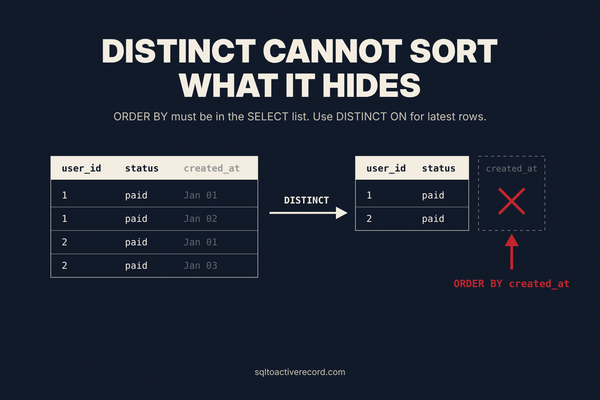
SQL SELECT DISTINCT in Rails ActiveRecord: distinct, DISTINCT ON and the ORDER BY Error
Convert SQL SELECT DISTINCT to ActiveRecord: distinct, pluck, DISTINCT ON and the PostgreSQL ORDER BY error, with tested Rails 8.1 examples.
Leave a Response
Responses (0)
No responses yet
Be the first to share your thoughts