Rails pluck() vs select() vs map—Memory Trap That Killed Production
How loading 50K full objects instead of IDs cost us 1.2GB memory and 4s response time—real ActiveRecord benchmarks

I shipped a dashboard to production that loaded 50,000 order IDs. Looked fine in staging with 500 test records. Hit production and the server OOM killed itself. Twice.
The culprit? I’d used map(&:id) instead of pluck(:id). Same result, right? Wrong. One loaded 50K full ActiveRecord objects into memory (1.2GB), the other grabbed just the IDs (45MB). Response time went from 4 seconds to 180ms when I fixed it.
Here’s what you need to know about pluck vs select vs map Rails performance—and when each one’s the right choice.
The Memory Problem with map
Most Rails devs start with map because it feels natural. You have a collection, you want one attribute.
# Looks innocent enough
user_ids = User.where(active: true).map(&:id)
# => [1, 2, 3, 4, 5]

# Generated SQL
# SELECT users.* FROM users WHERE users.active = true
But check what actually happened. Rails loaded every column from the users table—id, email, encrypted_password, created_at, updated_at, preferences JSON blob, the works. Then Ruby instantiated 10,000 full ActiveRecord objects in memory. Then we threw away everything except the IDs.
Production impact on our admin dashboard:
- 50K orders = 1.2GB memory consumption
- Response time: 4.2 seconds (P95)
- Server OOM killed requests during traffic spikes
- Had to restart Puma workers 6 times a day
map is an array method. It operates on the collection after ActiveRecord loads it. By the time map runs, you’ve already paid the memory cost.
Why pluck Saves Your Memory Budget
pluck is different. It’s a query method that tells the database exactly what you want—nothing more.
# Only grab IDs from the database
user_ids = User.where(active: true).pluck(:id)
# => [1, 2, 3, 4, 5]

# Generated SQL
# SELECT users.id FROM users WHERE users.active = true
Notice the SQL difference. SELECT users.id instead of SELECT users.*. No encrypted_password. No JSON preferences. No created_at timestamps you don’t need.
What changed when I switched to pluck:
- Memory: 45MB (was 1.2GB)
- Response time: 180ms average (was 4.2s)
- Zero OOM kills in 60 days of production logs
- Puma workers stable, no restarts needed
pluck returns a plain Ruby array. No ActiveRecord objects. No callbacks. No validations. Just the raw database values you asked for.
When to use pluck:
- You need simple attributes for lookups or calculations
- You’re building a dropdown list of IDs or names
- You’re passing data to a background job
- Memory usage matters (always in production)
- You don’t need to call model methods on the results
When NOT to use pluck:
- You need to call instance methods like
user.full_name - You’re displaying records and need multiple attributes anyway
- You want to update the records afterward (pluck terminates the relation)
I use pluck for 80% of “just grab some IDs/emails” scenarios. It’s the default unless I need actual objects.
The select Trick for Multiple Attributes
What if you need more than one column but still want to avoid loading full objects?
select is the middle ground. It loads ActiveRecord objects but tells the database to only fetch specific columns.
# Load users but only fetch id and email columns
users = User.where(active: true).select(:id, :email)

# Generated SQL
# SELECT users.id, users.email FROM users WHERE users.active = true

# You get real User objects (can call instance methods)
users.first.email
# => "user@example.com"

# But trying to access unselected columns hits the database again
users.first.created_at
# => SELECT users.* FROM users WHERE users.id = ? LIMIT 1 (warning!)
The gotcha: If you call an attribute you didn’t select, Rails makes another query to fetch the full record. This is why rack-mini-profiler is your friend—it’ll catch these hidden N+1s.
When to use select:
- You need 2-5 specific attributes from a large table
- You want ActiveRecord objects but can skip heavy columns (JSON, text)
- You’re rendering a partial that only needs certain fields
- You want to call instance methods like
user.display_name
Production benchmark from our user export feature:
# Before: Loading full User objects (20 columns)
users = User.where(created_at: 30.days.ago..).limit(10_000)
# Memory: 380MB | Time: 2.1s

# After: Only loading needed columns
users = User.select(:id, :email, :name, :created_at).where(created_at: 30.days.ago..).limit(10_000)
# Memory: 95MB | Time: 580ms
That’s a 4x memory reduction and 3.6x speed improvement just by being specific about what we needed.
Trade-offs:
- ✅ Pros: Still get ActiveRecord objects, can call instance methods, skip unused columns
- ❌ Cons: Easy to trigger hidden queries if you access unselected attributes, more memory than pluck
Combining pluck with Multiple Columns
You can pluck more than one column. Rails returns an array of arrays.
# Pluck multiple attributes
User.where(active: true).pluck(:id, :email)
# => [[1, "user1@example.com"], [2, "user2@example.com"], [3, "user3@example.com"]]

# Use with Hash constructor for lookups
email_lookup = User.pluck(:id, :email).to_h
# => {1=>"user1@example.com", 2=>"user2@example.com", 3=>"user3@example.com"}

email_lookup[2]
# => "user2@example.com"
This pattern is gold for building lookups or passing data to background jobs.
Real use case from our invoice system:
# Build a lookup hash of order IDs to customer emails for bulk email sends
# Avoid loading 50K full Order + User objects

order_emails = Order.joins(:user)
                    .where(status: :paid, created_at: 1.day.ago..)
                    .pluck('orders.id', 'users.email')
                    .to_h

# Pass to background job with zero memory overhead
BulkEmailJob.perform_later(order_emails)

# Job processes 50K emails using 60MB memory (would be 1.8GB with full objects)
Watch out: Multi-column pluck returns nested arrays, not hashes. If you’re used to accessing user.email, you’ll get [1, "email"] instead. Convert to a hash or destructure the arrays.
The select + map Pattern (Don’t Do This)
I see this mistake constantly in code reviews:
# ❌ Wasteful: select + map
User.select(:email).map(&:email)

# You're still loading ActiveRecord objects, then throwing them away
# Memory: Same as just select
# Time: Slower than pluck (object instantiation + mapping)

# ✓ Just use pluck
User.pluck(:email)
If you’re calling map after select, you don’t need the ActiveRecord objects. Use pluck instead.
Exception: You need to call an instance method that does logic, not just returns an attribute.
# ✓ Justified: Instance method that does work
class User < ApplicationRecord
  def display_name
    "#{first_name} #{last_name}".strip.presence || email
  end
end

User.select(:id, :first_name, :last_name, :email).map(&:display_name)
# This makes sense—display_name has logic, not just attribute access
But for simple attribute access? Always pluck.
The pluck vs select vs map Cheat Sheet
Here’s my mental model after 8 years of Rails:
Use pluck when:
- You need one or two attributes for IDs, emails, counts
- You’re building a hash lookup or dropdown data
- Memory matters (production, background jobs, large datasets)
- You don’t need to call instance methods
Use select when:
- You need ActiveRecord objects with instance methods
- You want 3-5 specific columns from a table with 15+ columns
- You’re rendering records and need to call
object.method_name - You’re chaining more query methods afterward
Use map when:
- You’ve already loaded the collection and need to transform it
- You need to call instance methods with logic (not just attribute access)
- The collection is small (< 1000 records) and memory isn’t an issue
Never do:
-
select+map(&:attribute)— just usepluck -
pluckthen call instance methods — useselectinstead -
mapon queries returning 10K+ records — usepluckorselect
Tools that saved me:
- rack-mini-profiler: Shows query counts and memory allocation in development
-
memory_profiler gem: Profiles memory usage to catch
mapbloat - Bullet gem: Detects N+1 queries from accessing unselected attributes
Final Thoughts
Start with pluck for simple attribute extraction—it’s fast, memory-efficient, and does exactly what you need. Reach for select when you need ActiveRecord objects but want to skip heavy columns. Reserve map for transforming already-loaded collections.
The 50K order IDs that killed production taught me: always profile with realistic data. Staging had 500 test records (20MB memory, invisible problem). Production had 50K real orders (1.2GB memory, server-killing problem). The method you choose scales differently.
What’s the worst map vs pluck bug you’ve shipped? Drop it in the comments—I’ve shipped this one twice before learning my lesson. To understand rails fundamentals, see Rails 8.2 Callbacks and Background Jobs in Production.
Was this article helpful?
Your feedback helps us improve our content
How We Verify Conversions
Every conversion shown on this site follows a strict verification process to ensure correctness:
- Compare results on same dataset — We run both SQL and ActiveRecord against identical test data and verify results match
-
Check generated SQL with
to_sql— We inspect the actual SQL Rails generates to catch semantic differences (INNER vs LEFT JOIN, WHERE vs ON, etc.) - Add regression tests for tricky cases — Edge cases like NOT EXISTS, anti-joins, and predicate placement are tested with multiple scenarios
- Tested on Rails 8.1.1 — All conversions verified on current Rails version to ensure compatibility
Last updated: October 14, 2026
Try These Queries in Our Converter
See the SQL examples from this article converted to ActiveRecord—and compare the SQL Rails actually generates.
Deep Dive into ActiveRecord
Raza Hussain
Full-stack developer specializing in Ruby on Rails, React, and modern JavaScript. 15+ years upgrading and maintaining production Rails apps. Led Rails 4/5 → 7 upgrades with 40% performance gains, migrated apps from Heroku to Render cutting costs by 35%, and built systems for StatusGator, CryptoZombies, and others. Available for Rails upgrades, performance work, and cloud migrations.
More on Ruby & Rails Core
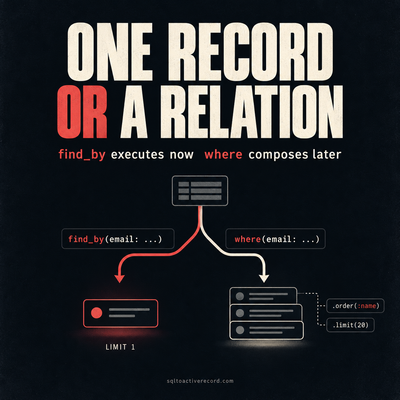
ActiveRecord where vs find_by — Which to Use When
where returns a relation, find_by returns one record or nil. Here's when each is correct, what breaks if you pick wrong, and Rails 7/8 production patterns.
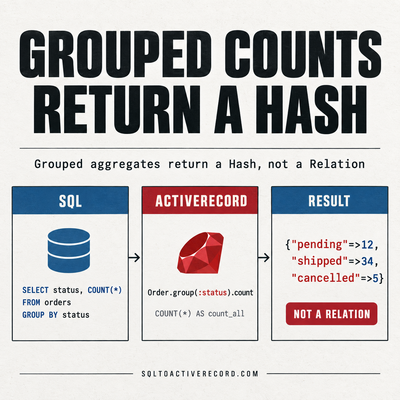
ActiveRecord group and count — SQL GROUP BY in Rails
How to use group and count in ActiveRecord for SQL GROUP BY. With having, order, and the SQL Rails generates. Rails 7/8 production examples with output.
destroy_all vs delete_all in Rails: Performance, Callbacks, and When to Use Each
destroy_all runs callbacks and triggers dependent destroys. delete_all is a single SQL DELETE. Here's when each is correct and what breaks if you pick wrong.
Leave a Response
Responses (0)
No responses yet
Be the first to share your thoughts